Figma plugin · Coming soon

Email in.
Clean layers out.

Paste any HTML email and get editable Desktop and Mobile frames in Figma. Clean auto layout, live text, your pictures, and only the layers you need.

Coming soon to Figma See how it works

Free for 10 emails a month. Your email’s HTML stays on your computer.

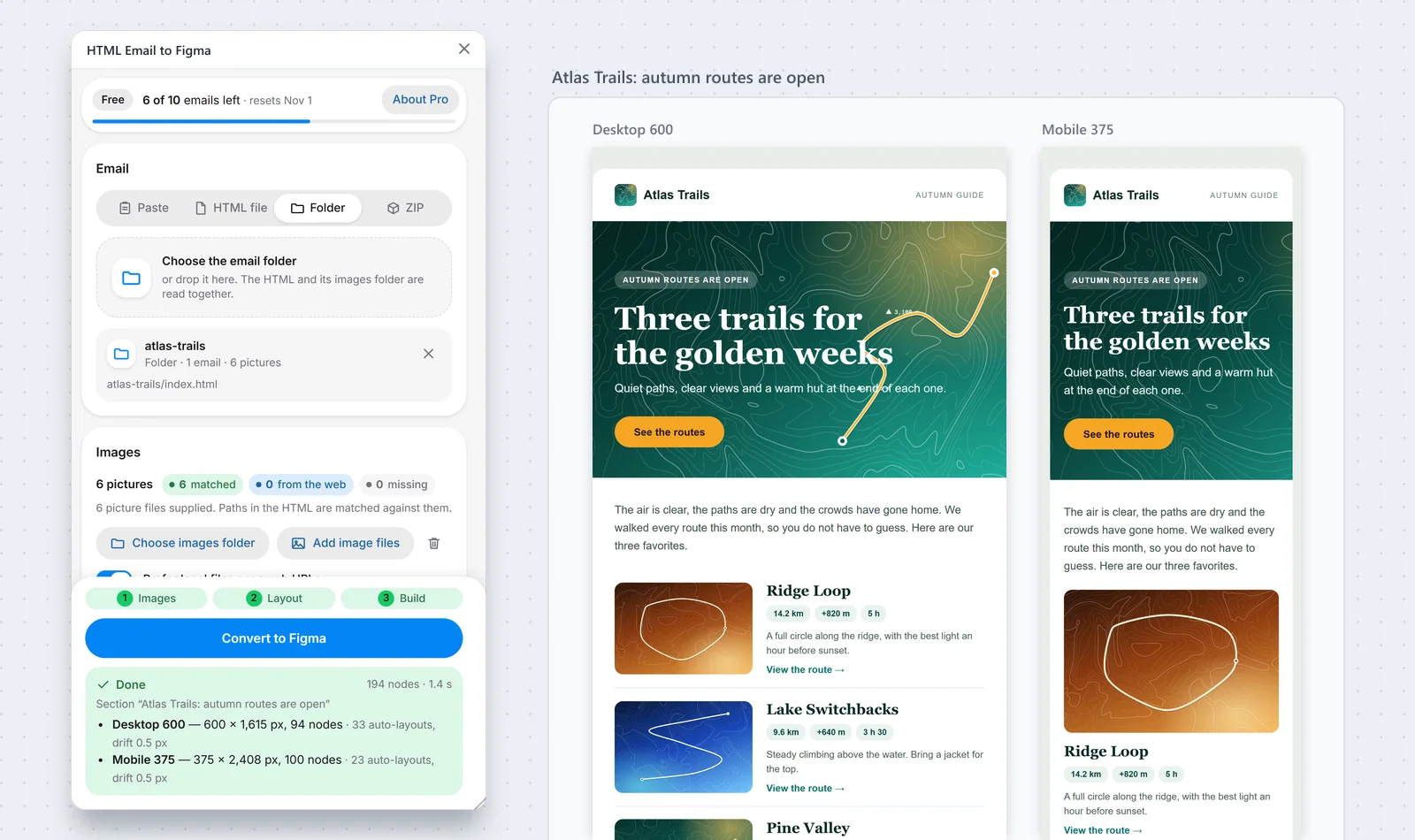
The HTML Email to Figma plugin window next to a Figma Section that holds a Desktop frame and a Mobile frame of a travel email

A made-up demo email. The window comes from our test build of the plugin. The two frames are drawn from the layout it builds.

10
free emails every month
38–48%
fewer layers in our demo emails
4
ways to bring an email in
0
emails uploaded to our servers

Made for email,
and only email

It does one job, and does it well: it rebuilds an HTML email the way a designer would draw it.

Built for email

Built only
for email

Emails are made of nested tables, inline styles and old tricks that confuse general tools. This plugin lets a real browser show the email first, then rebuilds what it sees. It works with any HTML email, whichever tool or template made it.

Fewer layers

Fewer layers,
cleaner files

Most of an email’s code is wrapping. A wrapper that paints nothing does not become a layer here. Only what you can see does: frames, text and pictures, each named by what it is.

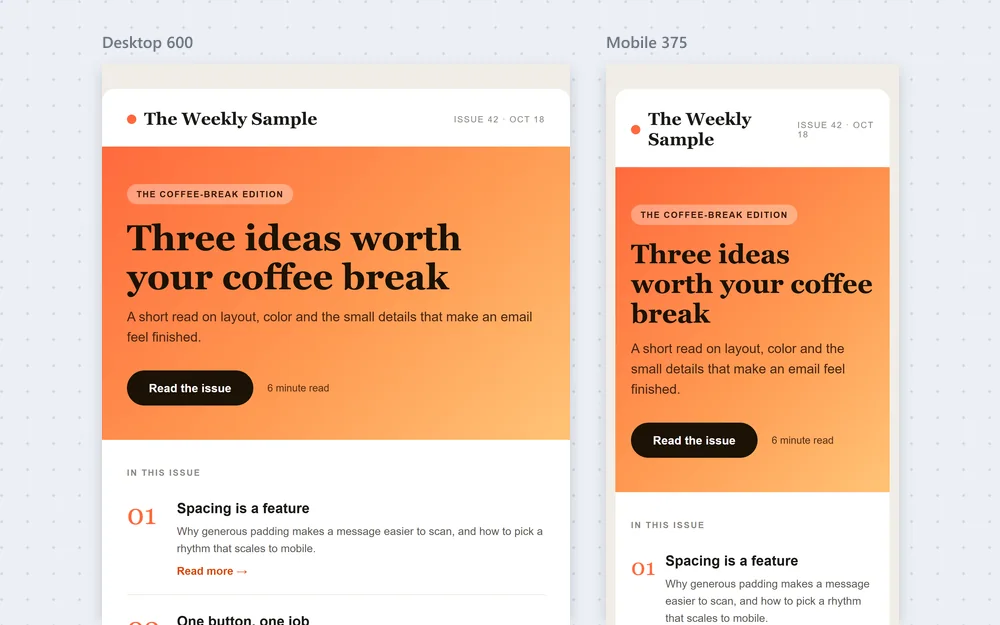
A Desktop frame and a Mobile frame of the same newsletter side by side on a Figma canvas
Desktop and Mobile

Desktop and Mobile
in one Section

You get a Desktop frame at the email’s own width. If the email has mobile styles, you also get a Mobile frame. Pick 320, 360, 375, 390 or 414, or type your own width. Both frames count as one email.

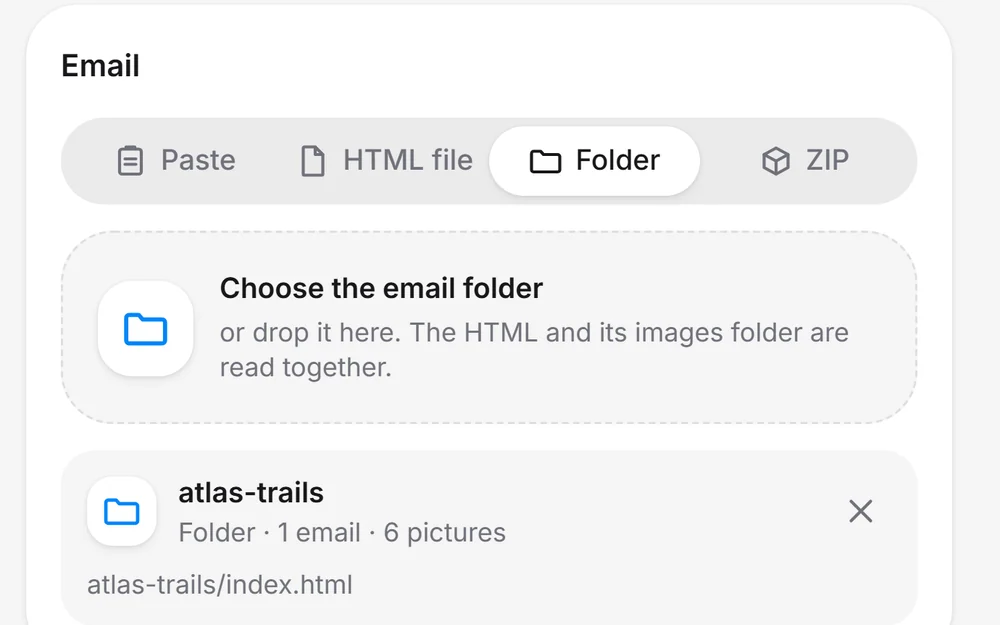
The plugin's Email card with the Folder tab chosen and one email folder loaded: 1 email, 6 pictures
Any way in

Bring the email in
any way you like

Paste the HTML, open a file, pick a folder or drop a ZIP. Pictures that sit next to the HTML are matched for you, and pictures on the web are downloaded.

Only the layers
you actually need

Here is the top of one demo email. On the left, the 13 HTML tags it is made of. On the right, the 5 layers you get.

In the email’s HTML 13 tags
  • <tr>
  • <td>
  • <table>
  • <tbody>
  • <tr>→ Row
  • <td>
  • <table>
  • <tbody>
  • <tr>→ Row
  • <td>
  • <img>→ Picture
  • <td>→ Text
  • <td>→ Text

13 tags for one small header. Most of an email is wrapping like this.

In your Figma file 5 layers
  • Rowauto layout
  • Rowauto layout
  • Image: Atlas Trails
  • Text: Atlas Trails
  • Text: Autumn guide
  • Two rows keep the side-by-side layout, as real auto layout.
  • The logo stays a picture, and each text stays one text layer.
  • The other 8 tags only wrapped things. They are gone, and their padding is now real padding.

Four demo emails, measured

A layer for every tag and piece of textHTML Email to Figma
Weekly newsletter81 tags · 29 pieces of text
40% fewer
Product launch162 tags · 44 pieces of text
38% fewer
Receipt114 tags · 37 pieces of text
38% fewer
Travel guide141 tags · 39 pieces of text
48% fewer

We counted every tag and every piece of text in the body of each made-up demo email. Then we counted the layers the plugin builds for its Desktop frame: frames, text and pictures, spacers included. These numbers come from our own test build, run in a browser. Inside Figma they may differ a little.

Everything it does,
in plain words

No jargon and no setup. Here is what happens to your email.

Real auto layout

Rows and columns become auto layout, with padding, spacing and alignment set.

Live text

Text stays editable. Bold, colour, size and links inside a line are kept.

Fonts matched

The email’s fonts are matched to fonts you have in Figma.

Your pictures

Pictures from your folder or ZIP are matched by path. Web pictures are downloaded.

Colours and shapes

Backgrounds, gradients, borders, rounded corners and shadows come across.

Links stay links

A link in the email is a link on the text in Figma.

Layers named by role

Banner, Card, Row, Divider and more. No more Frame 482.

Spacing you can trust

Gaps are measured, not guessed. The plugin checks its work and shows the difference in pixels.

A Mobile frame

Built from the email’s own mobile styles, at 320 to 414 pixels or your own width.

Hidden things stay out

Hidden text, preheaders and tracking pixels are left out of your file.

A meter you can read

See how many free emails are left and the day they come back.

Safe by default

The email is treated as untrusted. Nothing inside it can run.

Read the guide

Made for people
who work with email

If you have ever looked at a sent email and thought “I wish this were in Figma”, this is for you.

Email designers

The source file is gone, or the email only exists as HTML.

Get an editable file in one go and redesign from there, instead of redrawing every block by hand.

Email developers and agencies

A client sends a live email and asks for a refresh.

Turn it into a Figma file for review, QA and hand-off, and compare the build with the design side by side.

Marketing and lifecycle teams

Last month’s campaign worked, but nobody can find the design.

Start next month’s email from the HTML you already sent, with clean layers your team can edit.

Brand and product designers

Receipts, welcome and reset emails live in a dozen tools.

Line them up in one Figma file and see what is off brand, with layers you can actually read.

From email to frames
in three steps

No account with us and no setup. Open the plugin, add your email, press Convert.

  1. 1

    Open the plugin

    In Figma, open Plugins and run HTML Email to Figma. It opens as a small window next to your canvas.

  2. 2

    Add your email

    Paste the HTML, or choose a file, a folder or a ZIP. Pictures next to the HTML are matched for you.

  3. 3

    Press Convert

    You get one Section with a Desktop frame and a Mobile frame. Auto layout is on, the layers are named, and the text is yours to edit.

Start free.
Go unlimited when you need to.

Every month you get 10 free emails. Pro has no limit.

Free

$0forever

10 emails every month

  • Desktop and Mobile frames
  • Auto layout, pictures and fonts
  • Paste, HTML file, folder or ZIP
  • Fewer, cleaner layers
  • Resets on the 1st of every month
Coming soon to Figma

No card needed. Free emails that you do not use do not roll over.

Pro

Coming soon

$20a month · unlimited emails

Everything in Free, with no monthly limit

  • No limit on emails (fair use applies)
  • Same engine, same clean layers
  • Bought inside the plugin, paid through Figma
  • Tied to your Figma account, not to one computer
Pro is coming soon

Figma shows the billing details at checkout. Pro goes on sale after the plugin is published.

Compare the plans

Simple to count,
private to use

One email is one credit, and your email never leaves your computer.

Fair credits

One email is one credit...

Pressing Convert uses one free email, even though you get both a Desktop and a Mobile frame. If a run fails, the email is given back. Free emails come back on the 1st of every month.

Privacy first

...and your email stays yours

Everything runs on your computer, inside Figma. Our credits service only learns a random install ID, the plugin version and the month, so it can count your free emails. Read the details in the privacy policy.

Questions,
answered

What does HTML Email to Figma do?
It turns the HTML of an email into clean, editable frames in Figma. You get real auto layout, live text and your pictures, in a Desktop frame and, when the email has mobile styles, a Mobile frame.
Which emails does it work with?
Any HTML email: newsletters, promotions, product launches, receipts and more. It reads the finished email the way a browser shows it, so it does not matter which tool or template made it. Tricks that need JavaScript or a mouse hover are not applied.
Why are there fewer layers?
Most of an email’s code is wrapping, such as tables inside tables. A wrapper that paints nothing does not become a layer. Only what you can see does: frames, text and pictures. In our four demo emails that meant 38% to 48% fewer layers than one for every tag and piece of text.
Is it free?
Yes, to start. You get 10 free emails every month, and they come back on the 1st. Pro removes the limit for $20 a month and is coming soon. See the pricing page.
What counts as one email?
One press of Convert. The Desktop and Mobile frames made from the same email together use one. If a run fails, the email is given back.
Is my email sent anywhere?
No. The HTML is read on your computer, inside Figma, and we never receive it. Pictures on the web are downloaded from the sites that host them, just as a browser would. Our credits service only gets a random install ID, the plugin version, a random conversion ID and the month.
Do I need an account?
Not with us. There is nothing to sign up for. Pro will be paid through your Figma account.
Can I bring the pictures with the email?
Yes. Choose the email’s folder or ZIP and the pictures next to the HTML are matched for you. You can also add picture files, or let the plugin download pictures from the web. A picture that cannot be loaded stays as a grey placeholder, with a plain reason.
What about fonts?
The plugin matches the email’s fonts to fonts you have in Figma. A web font that is not installed in Figma is replaced with a close one.
Will it match my email exactly?
It aims to. The plugin compares its layout with the measured email and shows the largest difference in pixels, so you can see how close it is. Fonts and tricks that need JavaScript or hover can still make a result differ.
When can I use it?
Soon. The plugin is built and in its last checks. The final tests inside Figma come before release. The release notes will show the first version when it is out.
Help & Support

HTML Email to Figma

Stop redrawing emails.
Start editing them.

10 emails free every month. No account with us, and your email’s HTML never leaves your computer. The plugin is coming soon to Figma.

Coming soon to Figma

FREE FOR 10 EMAILS A MONTH · PRO IS UNLIMITED