
Write to us
Email a real person at Rocuo. We read every message.
info@rocuo.comEmail a real person at Rocuo. We read every message.
info@rocuo.comEvery widget, shortcut and setting is explained, with pictures.
Open the guideThe release notes list what is new in each version.
Release notesQuick fixes
Open the one that matches what you see. Each answer is short and goes step by step.
Each day opens a new, empty board. Press Ctrl+H to open the history panel and visit earlier days. Widgets you pinned come back every day.
If you cleared your browser's data or removed the extension, the boards are gone. You can bring them back only from a backup file.
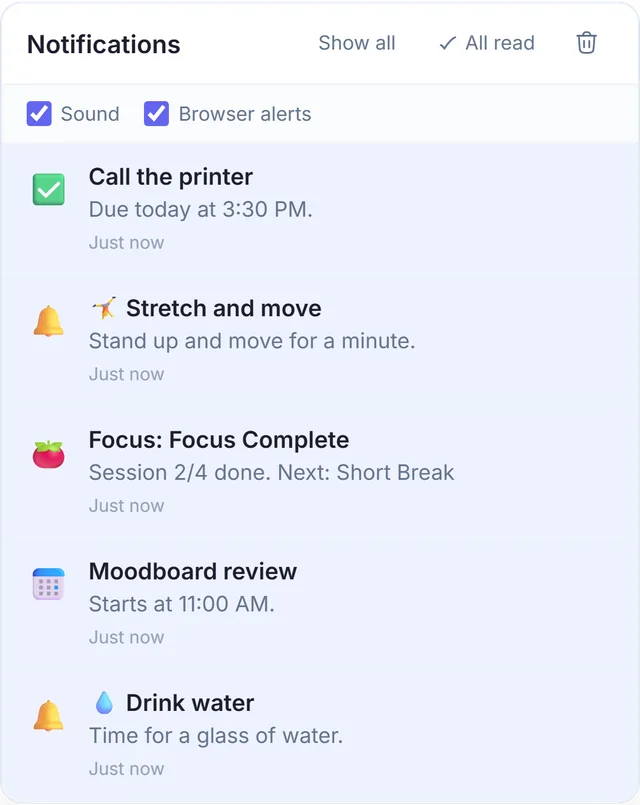
Since version 1.9.0 you choose how long a notification stays, and it starts at 30 seconds. Before, it stayed about 5 seconds.
The choice counts for every notification of VibeBoard: reminders, timers, the Pomodoro, the calendar, tasks and new posts of a news feed. Some systems, such as macOS and a few Linux desktops, decide the time themselves and may hide a notification sooner. Do Not Disturb and Focus Assist can hide it too.
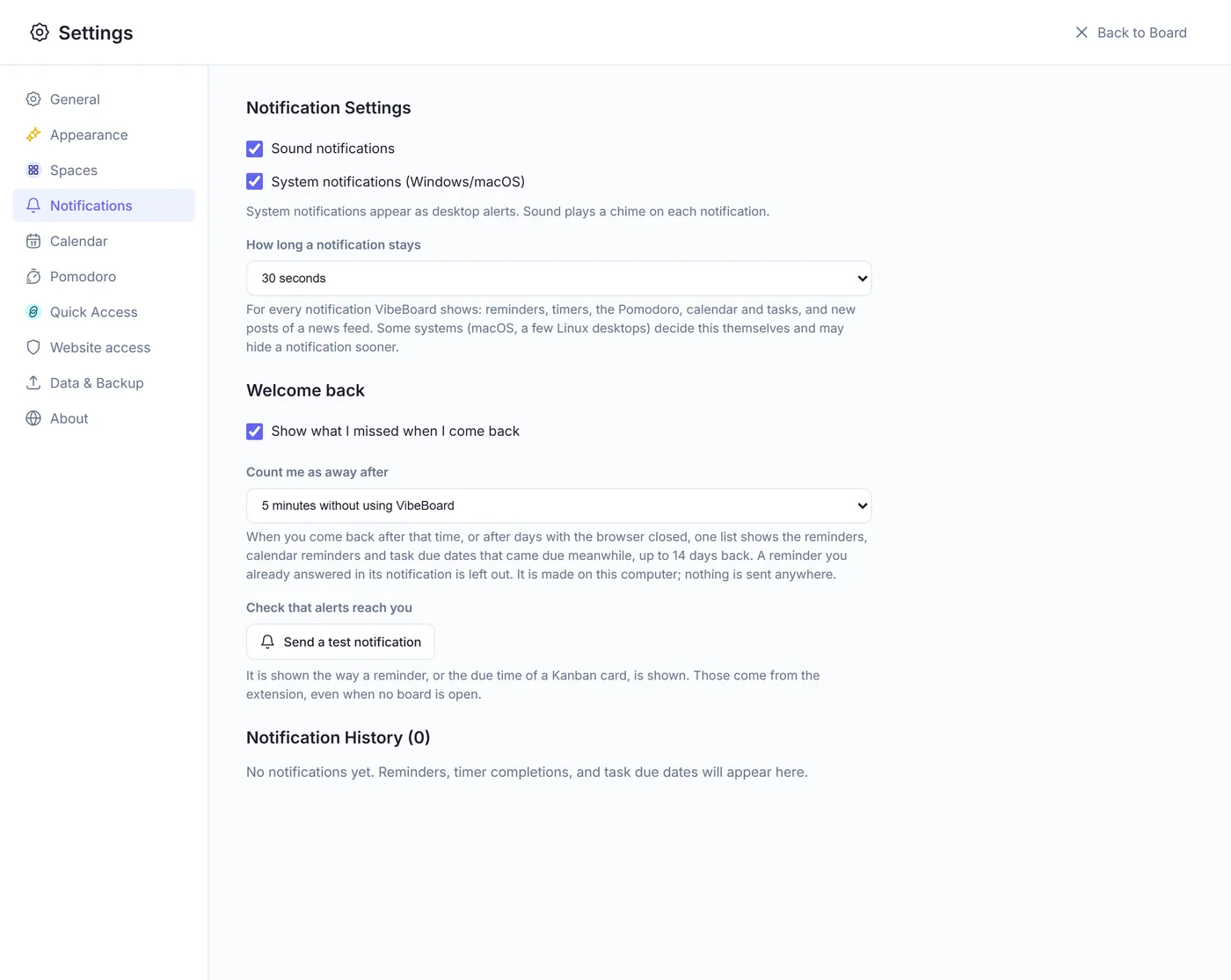
When you come back, VibeBoard shows one list, inside the board, of the reminders, calendar reminders and task due dates that came due while you were away. It works after a few minutes, and also after days with the browser closed, up to 14 days back. A reminder you already answered in its notification is left out.
The list is made on your computer and nothing is sent anywhere. It shows up when you open VibeBoard, so a reminder cannot reach you while Chrome is closed, but you see it when you return.
A space is a board of its own with a name and an emoji. The spaces are listed in a row at the left edge of the board, under today’s board.
The widgets of a space are part of a backup, so export one before you remove a space you may need again. The guide explains spaces and search in detail.
The 21 boards need version 1.9.0. An older VibeBoard adds the widgets it knows and says how many it left out. Open Settings → About: if it shows 1.8.0 or older, Chrome has not given you the new version yet. See How do I update VibeBoard? below.
To add a board you downloaded from the boards page, open the Ready-made boards window and press Add from a file. That needs no permission for rocuo.com.
Your boards live only in your browser, so a backup is the best way to keep them safe or move them to another computer.
vibeboard-backup- followed by the date is saved on your computer.The backup holds your boards, spaces, Quick Items, calendar events and reminders. Files in the Files widget are not included, only their names and links. The saved logins of the Password widget are not included either: that widget has its own backup, under Vault settings.
Chrome updates VibeBoard by itself, so you usually do nothing. Chrome waits while the extension is running, and an open board keeps it running.
The note and the Updates card came with version 1.6.0. A copy older than that has neither, so to reach a newer version use the last choice. If Settings → About still shows an older number, Chrome has not given you the new version yet.
Chrome puts your extensions on every computer where you sign in with the same Google account and sync is on. VibeBoard cannot install itself on another computer.
Sync works only for extensions installed from the Chrome Web Store, and a work or school computer can block it. Your boards stay on the computer where you made them. To move them, use Settings → Data & Backup (see the backup answer above).
Icons for shortcuts and links come from Google's icon service, so they need an internet connection. In a Link Group, a website you allowed can also bring its own icon. When an icon cannot load, VibeBoard shows the first letter of the site on a colored tile. Nothing is wrong with your board.
Since version 1.7.0 a right-click shows Chrome’s own menu, as on any other page, so you can copy and paste in a note. The widget menu of VibeBoard is behind the three dots.
If Settings → About shows 1.6.0 or older, Chrome has not given you the new menu yet, and the right-click still opens the old one. See How do I update VibeBoard? above.
There are two ways, and both work on every widget.
Press Esc while you drag to put the widget back. If you want to be sure that no text gets selected, use the grip button.
VibeBoard asks for no website access when you install it. When you add a news channel, add a website to a Link Group, or open the ready-made boards, VibeBoard needs to read that one website, so Chrome shows its own question. You can say no. The channel or the website then does not load, and nothing else changes.
To see or take back what you allowed, open Settings → Website access. A Google widget does not ask: the browser loads the Google page after you choose it.
VibeBoard follows your computer. Change the mode in the settings of your computer, and the board follows. There is no switch inside VibeBoard since version 1.8.0. In Settings → Appearance you can still choose the board color for light mode and for dark mode.
A Google widget shows a page of Google inside the widget. It shows your document when you are signed in to Google in the same Chrome and that account may open the document. A document published to the web shows to anyone.
VibeBoard never signs in to Google for you and cannot read what the widget shows. It cannot create or change a Calendar event, or upload to Drive, because that needs a Google sign-in that VibeBoard does not have.
Press Alt and a letter to add a widget, for example Alt+N for a note. On a Mac, use Option instead of Alt. Shortcuts do not work while you type in a text field.
See the full list of shortcuts and the documentation for every widget.
Keep a link to it in the Files widget. A click opens it in a new Chrome tab.
C:\Users\you\Documents on Windows or /Users/you/Documents on a Mac.Chrome does not let an extension open Explorer or Finder, so a folder opens as Chrome’s own list of that folder. A folder you drop on the widget is not kept, because it has no file to copy: paste its path as a link, or drop the files in it. If Chrome cannot show a file, such as a Word or Excel file, it offers the file as a download.
Nobody can recover it. The PIN or password is never saved, not even on your device, and Rocuo has no copy, so the saved logins stay locked.
Your boards and every other widget are not affected.
No. VibeBoard has no account and no server, so we cannot see your boards and cannot recover them for you. Read the full details in the privacy policy.

We will do our best to help. Please tell us your Chrome version and what you saw.
We read every message